
Using Git Submodules with Local Overrides
Managing your own libraries as Git submodules can be awkward: normally, you have to push and pull between different directories to keep everything in sync. A handy trick is to keep the submodule pointing at your public remote (for others who clone your project), while locally overriding the submodule's URL to use your own local checkout. This way you get fast iteration, and others still have a smooth experience. Read more: www.tigger.dev/how-to/gi…
Image manipulation from the command line
Get an image's resolution
$ magick identify going-fishing.jpg
going-fishing.jpg JPEG 5422x3648 5422x3648+0+0 8-bit sRGB 12.2217MiB 0.000u 0:00.003
Convert an image to a different format
$ magick convert going-fishing.jpg going-fishing.pngResize an image
$ magick convert going-fishing.jpg -resize 800x600 going-fishing-resized.jpgOnly specify width or height
$ magick convert going-fishing.jpg -resize 800x going-fishing-resized-width.jpg
$ magick convert going-fishing.jpg -resize x600 going-fishing-resized-height.jpg
By percentage
$ magick convert going-fishing.jpg -resize 50% going-fishing-resized-percent.jpgCrop an image
$ magick convert going-fishing.jpg -crop 800x600+100+100 going-fishing-cropped.jpgRotate an image
$ magick convert going-fishing.jpg -rotate 90 going-fishing-rotated.jpgAdd a border to an image
$ magick convert going-fishing.jpg -bordercolor black -border 10x10 going-fishing-bordered.jpgAdd text to an image
$ magick convert going-fishing.jpg -gravity South -pointsize 36 -fill white -annotate +0+10 "Going Fishing" going-fishing-text.jpgConvert an image to grayscale
$ magick convert going-fishing.jpg -colorspace Gray going-fishing-grayscale.jpgCreate a thumbnail
$ magick convert going-fishing.jpg -thumbnail 150x150 going-fishing-thumbnail.jpgCombine multiple images into a single image
$ magick convert image1.jpg image2.jpg image3.jpg +append combined-horizontal.jpg
$ magick convert image1.jpg image2.jpg image3.jpg -append combined-vertical.jpg
Watermark an image
$ magick convert going-fishing.jpg watermark.png -gravity southeast -geometry +10+10 -composite going-fishing-watermarked.jpgWatch Youtube with Auto-Translated Captions
Instructions for Subtitles in English
How to get English (or any other language!) subtitles auto-generated while watching a video in another language
On the Youtube video you'll see a little button that looks like a "gear" with cogs, something you might see if you opened up an old wrist watch :)
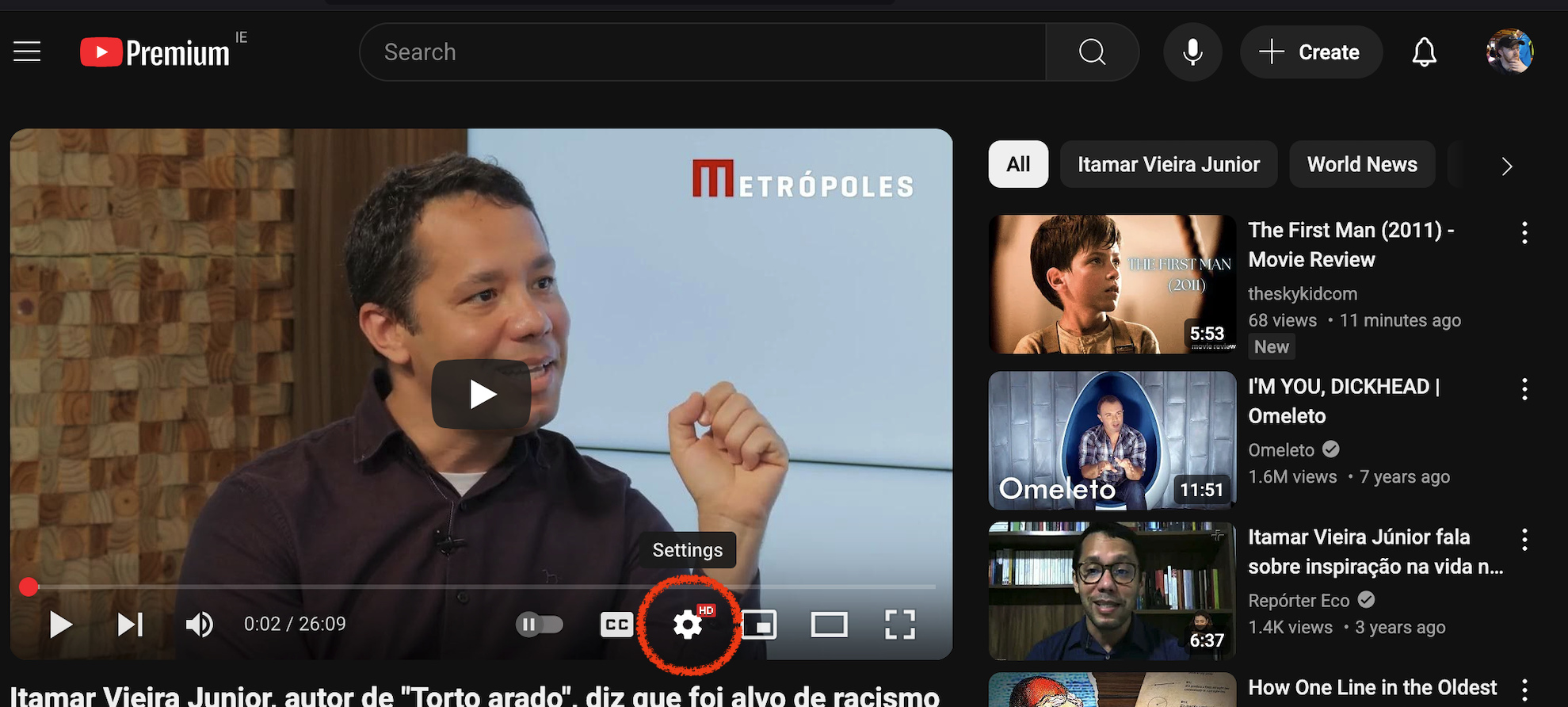
Click this, then choose Subtitles:
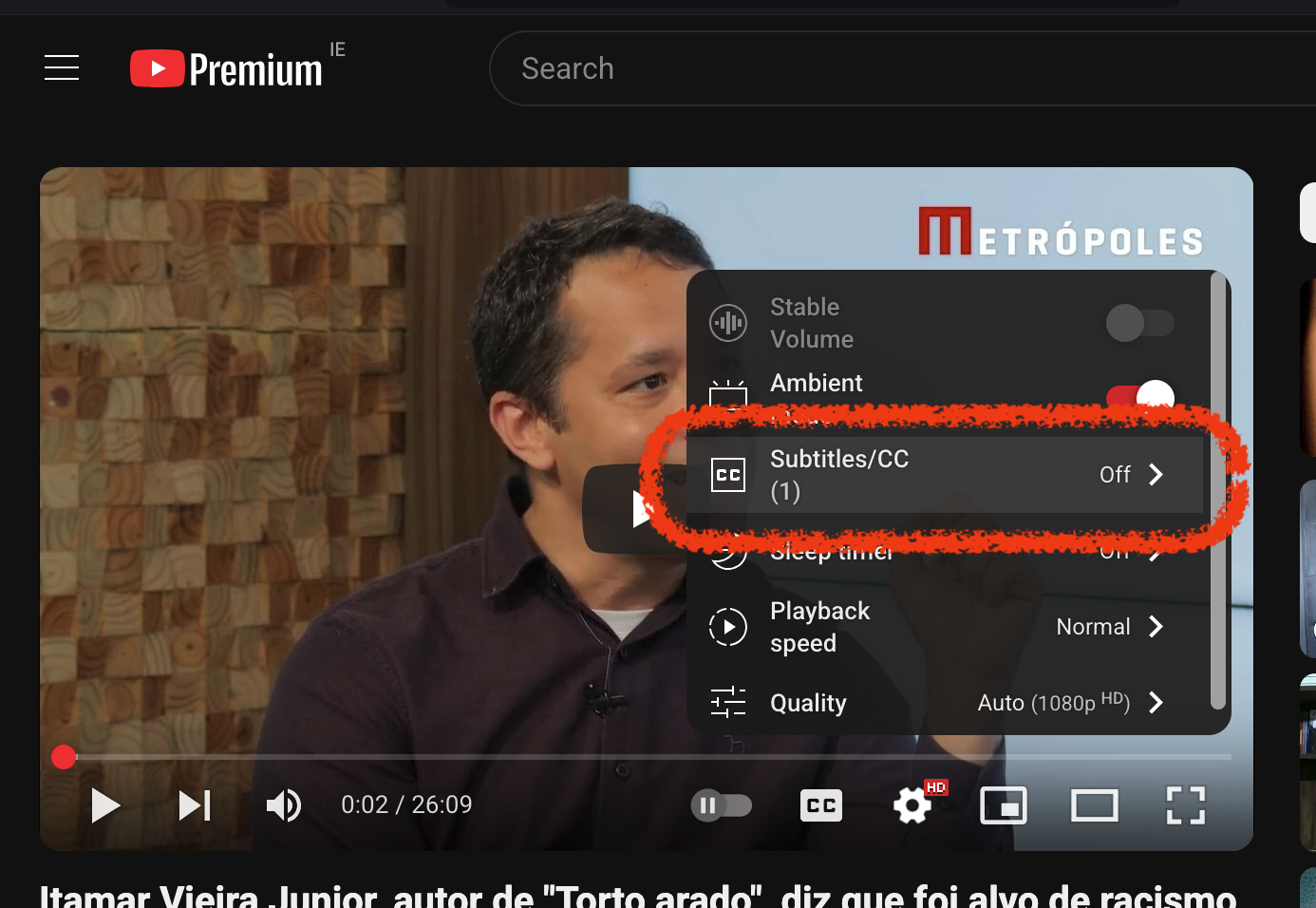
Here you can see three options, click Auto-Translate:
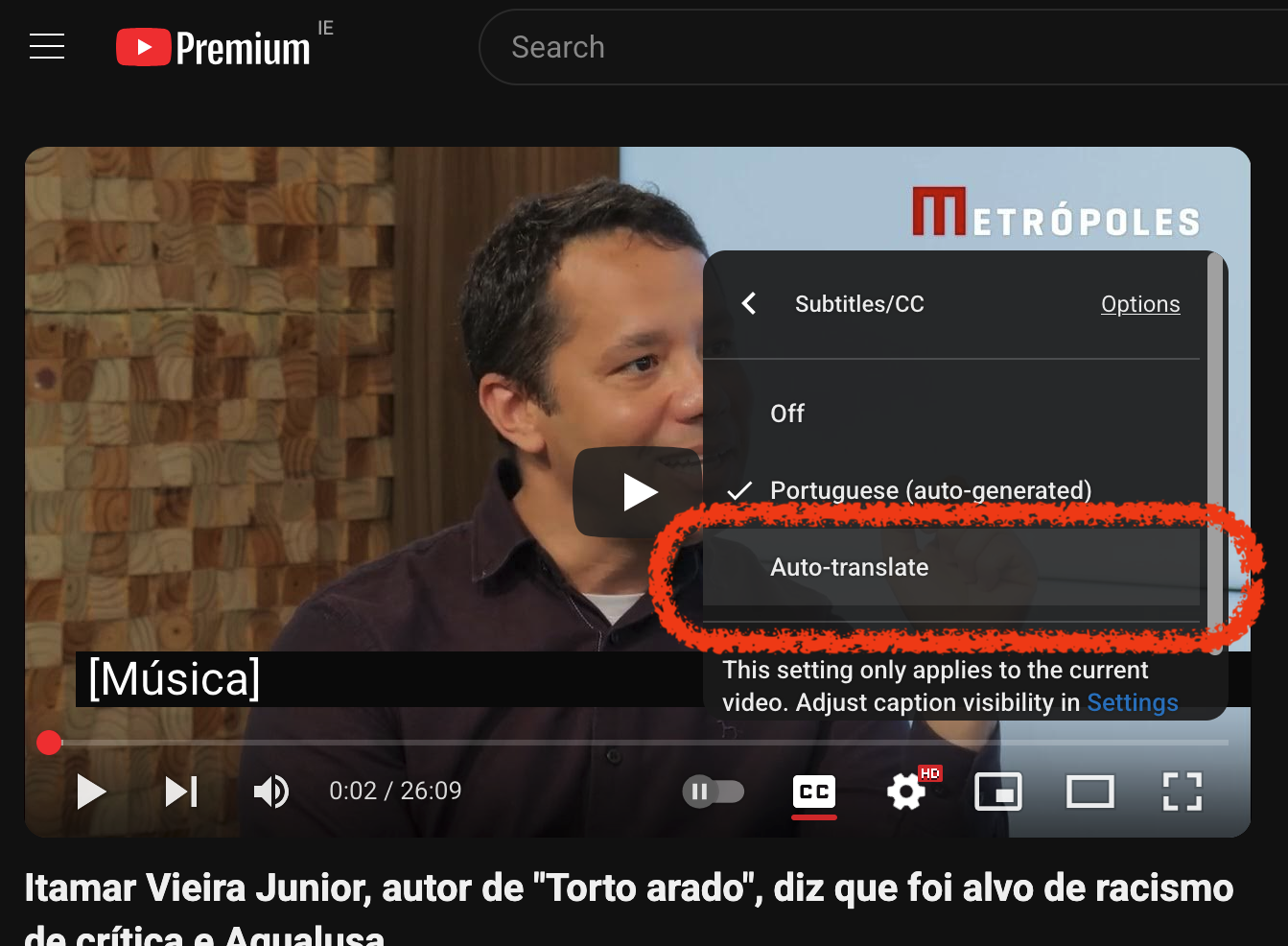
Now you will have to scroll down to find English … or whatever your preferred language is! Danish is in there, even Irish!
Noodles Forever
Inside my head dwells a hyperactive 11-year-old boy. From dawn til dusk, he rattles on with endless observations, comments and questions about the things that were, are, and might come to be. He is rarely appeased, but after a bit of work I can usually get him under control with a few routines.
My morning ritual begins with Toby, my canine BFF: we roam an old golf course as he tries to outwit me in pursuit of his life's work: the throwing of the ball.
Bulk delete bookmarks in Microsoft Word
When I convert from orgmode to Word via Open Document format, I often find the document is littered with superfluous bookmarks. These don't really do much of anything in Word, but if you share it further and someone opens it with Google Workspace vis Gmail or Google Drive, you find the doc has become a big ugly morass where you can barely read the doc. Thanks Google.
In Word's Developer tab, click on Visual Basic to open the VBA editor. In the editor, go to Insert > Module to create a new module. Then add the following code:
Firefox: disable autofill in forms
How to disable autofill (or autocompletion) in Firefox forms
For some reason they don't make this so straightforward any more.
Just go to about:config and set
browser.formfill.enable = false
browser.formfill.expire_days = 1
services.sync.prefs.sync.browser.formfill.enable = false
There's a suggestion that setting browser.formfill.expre_days to 0 is more secure for expiring existing saved data, however 0 often means never expire. Without looking at the code, I'm just going to err on the (to my mind) safer bet of setting it at 1.
What you need to understand about AI to avoid being left behind
As we blaze through the AI hype-cycle, excitement is matched only in the level of sheer panic it has induced. Is it only a matter of time until we're all replaced by robots?
AI-pocalypse?
First let's clarify what we're on about. Artificial Intelligence (AI) not new: spell check is a rudimentary example and it's been around for donkey's years. Also sat-nav, spam filtering, auto-correct, and more. AI is vital in modern accessibility tools – a point I wish more people would bother to educate themselves on before coming up with blanket bans on "AI" in their respective fiefdoms. But I digress. Not for the first time the goal-posts are shifting. And this time something has snapped in our collective consciousness beginning with the launch of OpenAI's ChatGPT bringing Generative AI (GenAI) and Large Language Models (LLMs) to the masses in 2023.
What you need to understand about AI to avoid being left behind
As we blaze through the AI hype-cycle, excitement is matched only in the level of sheer panic it has induced. Is it only a matter of time until we're all replaced by robots?
AI-pocalypse?
First let's clarify what we're on about. Artificial Intelligence (AI) not new: spell check is a rudimentary example and it's been around for donkey's years. Also sat-nav, spam filtering, auto-correct, and more. AI is vital in modern accessibility tools – a point I wish more people would bother to educate themselves on before coming up with blanket bans on "AI" in their respective fiefdoms. But I digress. Not for the first time the goal-posts are shifting. And this time something has snapped in our collective consciousness beginning with the launch of OpenAI's ChatGPT bringing Generative AI (GenAI) and Large Language Models (LLMs) to the masses in 2023.
Goddamned Clocks!
As my mother reminded me of the change of our clocks yesterday, it landed upon me as a smirk since it reminded me of the rather insane rabbit hole I went down the last time I wrote about it here.
But then I was caught out twice. Our digital devices change themselves automatically, from my phone to computer to the cheap analogue clock I got in Lidl for €10 that updates itself from a mysterious radio tower somewhere. So of course it was my father's analogue kitchen clock that caught me out. The usual pantomime around this device is for it to tell the wrong time for at least ten days before I get impatient and change it myself.
Goddamned Clocks!
As my mother reminded me of the change of our clocks yesterday, it landed upon me as a smirk since it reminded me of the rather insane rabbit hole I went down the last time I wrote about it here.
But then I was caught out twice. Our digital devices change themselves automatically, from my phone to computer to the cheap analogue clock I got in Lidl for €10 that updates itself from a mysterious radio tower somewhere. So of course it was my father's analogue kitchen clock that caught me out. The usual pantomime around this device is for it to tell the wrong time for at least ten days before I get impatient and change it myself.
WTF

What's this for?
This blog is a notebook. I use it to write down useful snippets of code, how-to guides, and to distill my thinking on various tech issues. It is for bits and pieces that used to get written in to my various notebooks in disjointed fragments. This is a personal exercise in putting some discipline on to it.
Perhaps maybe be of use to someone else who comes across it. However I do not market this site nor anticipate a great readership. I'm not super on social media, but if you do come across it, and any feedback – good or bad – a question, or just to say hey, please do get in touch.
WTF

What's this for?
This blog is a notebook. I use it to write down useful snippets of code, how-to guides, and to distill my thinking on various tech issues. It is for bits and pieces that used to get written in to my various notebooks in disjointed fragments. This is a personal exercise in putting some discipline on to it.
Perhaps maybe be of use to someone else who comes across it. However I do not market this site nor anticipate a great readership. I'm not super on social media, but if you do come across it, and any feedback – good or bad – a question, or just to say hey, please do get in touch.
Contact

Social
- me on bluesky
- @tigger@twit.social on mastodon
Contact Form
You may also be interested in
- my my art work at tigger.gallery
- poetry at tadg.ie
- sudo su tigger.ie
Contact
Social
- me on bluesky
- @tigger@twit.social on mastodon
Contact Form
You may also be interested in
- my my art work at tigger.gallery
- poetry at tadg.ie
- sudo su tigger.ie
Lament of the Frontier Guard: Li Po translations
See how Li Po's Chinese poem Lament of the Frontier Guard comes out through various translation engines, and then the famous Ezra Pound translation.
Li Po was an 8th century Chinese poet and is considered one of the greatest poets in Chinese history. He is known for his romantic and imaginative style, often exploring themes of nature, friendship, and the passage of time. His work has been translated into many languages and continues to be celebrated today, and is on the curriculum in many schools in China and around the world.
Lament of the Frontier Guard: Li Po translations
See how Li Po's Chinese poem Lament of the Frontier Guard comes out through various translation engines, and then the famous Ezra Pound translation.
Li Po was an 8th century Chinese poet and is considered one of the greatest poets in Chinese history. He is known for his romantic and imaginative style, often exploring themes of nature, friendship, and the passage of time. His work has been translated into many languages and continues to be celebrated today, and is on the curriculum in many schools in China and around the world.
AI Safety
Using AI generated material
Before using information or data generated by an AI service, be aware:
- Generative AI can hallucinate, which is another way of saying it makes things up. Check all information before using it. Carefully parse summaries in case it misses nuance or key information.
- Always disclose when using content directly generated by an AI model. That's not just best practice, it's the law1.
- Don't use it for anything critical (legal, medical, life-critical, …). It is not a subsitute for a human.
Your data
Before uploading data to an AI service:
AI Safety
Using AI generated material
Before using information or data generated by an AI service, be aware:
- Generative AI can hallucinate, which is another way of saying it makes things up. Check all information before using it. Carefully parse summaries in case it misses nuance or key information.
- Always disclose when using content directly generated by an AI model. That's not just best practice, it's the law1.
- Don't use it for anything critical (legal, medical, life-critical, …). It is not a subsitute for a human.
Your data
Before uploading data to an AI service: